

Overview
When a cardholder disputes a transaction, the process that follows is governed by card scheme rules that are detailed, deadline-driven, and change regularly. Enfuce’s Dispute Management service handles this on your behalf — so you do not need to build internal expertise in scheme dispute procedures, track rule updates across Visa and Mastercard, or manage the back-and-forth of representment and pre-arbitration yourself. Enfuce processes cardholder credits, chargebacks, write-offs, arbitration and compliance cases, and mandatory fraud reporting to card schemes. Your team’s role is limited to accepting the dispute from the cardholder and notifying Enfuce — the rest is handled.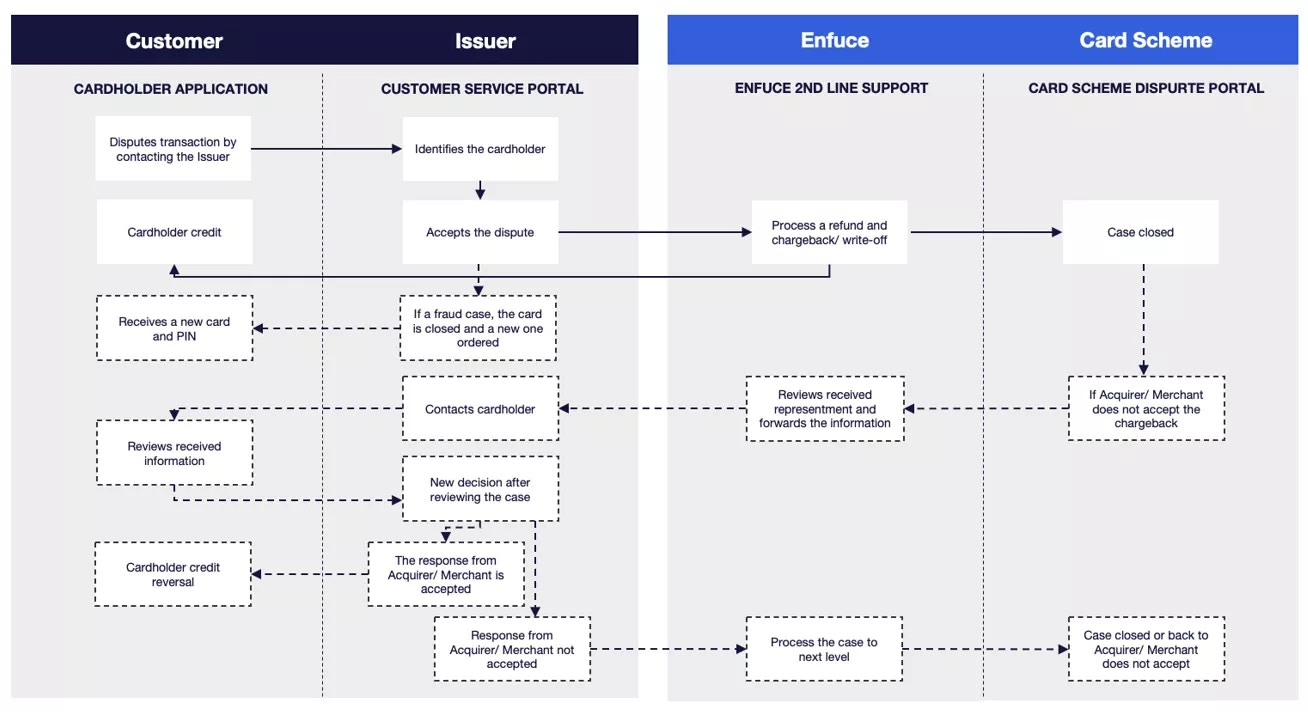
What Dispute Management covers
Cardholder credits Once a dispute is accepted, Enfuce processes the provisional or final credit to the cardholder’s account as appropriate. Cardholders are not left waiting while scheme processes run in the background. Chargeback processing Enfuce manages the full chargeback lifecycle with Visa and Mastercard — submission, representment responses from the acquirer, and pre-arbitration if the dispute escalates. You do not need to interact with the schemes directly at any stage. Write-offs Where a dispute cannot be recovered through the chargeback process, or where the cost of pursuing it exceeds the transaction value, Enfuce can write off the balance directly. This avoids the operational overhead of chasing unrecoverable amounts. Scheme reporting Fraud and dispute reporting to Visa and Mastercard — including TC40 and SAFE filings — is handled by Enfuce as part of the service. These are mandatory obligations with strict deadlines and specific data requirements. Enfuce submits them accurately and on time without requiring you to compile or deliver the data separately. Arbitration and compliance cases In cases that escalate beyond pre-arbitration, Enfuce manages the arbitration and compliance filing process with the relevant scheme on your behalf.How the dispute process works
The process follows a clear sequence of responsibilities across your team and Enfuce:- Cardholder contacts your customer service to dispute a transaction.
- Your team identifies the cardholder and accepts the dispute. Enfuce provides guidance and training to support your team in handling these conversations correctly.
- Your team notifies Enfuce — via the MyEnfuce portal or the Dispute API — with the relevant case details.
- Enfuce processes the cardholder credit and initiates the chargeback with the card scheme according to scheme rules.
- Enfuce manages all follow-up actions — representment, pre-arbitration, scheme reporting — until the case is resolved. If the dispute originates from a confirmed fraud case, Enfuce also handles the fraud reporting to the card scheme at the same time.
Scope of actions by ledger model
The range of dispute resolution actions Enfuce can perform on your behalf depends on whether your programme operates on the Enfuce ledger or your own ledger. This distinction matters because several actions — particularly those that directly affect cardholder balances — can only be executed by Enfuce when it holds and controls the underlying financial record.Enfuce ledger customers
When your programme runs on the Enfuce ledger, Enfuce holds the authoritative record of cardholder balances and transactions. This gives the Enfuce dispute team direct access to execute financial adjustments as part of the resolution process, without requiring a separate action on your side. The full range of dispute resolution actions is available:- Cardholder credit — Enfuce applies provisional or final credits directly to the cardholder’s account. No instruction from your system is required.
- Write-offs — Where a dispute cannot be recovered, Enfuce writes off the balance directly against the ledger.
- Chargebacks — Enfuce initiates and manages the full chargeback lifecycle, including submission, representment, and pre-arbitration. The financial outcome is reconciled directly against the cardholder record once the scheme process concludes.
- Scheme reporting — TC40 and SAFE filings are submitted by Enfuce using transaction-level data it holds as part of the ledger record. No separate data provision is required from you.
Customers with their own ledger
When you maintain your own ledger, Enfuce does not hold or control the cardholder balance record. Financial adjustments — credits and write-offs — must originate within your own system. Enfuce’s role in this model covers the actions that operate at the scheme and network level:- Chargebacks — Enfuce initiates and manages the chargeback process with the card scheme, including representment and pre-arbitration. However, the financial reconciliation of the outcome must be handled by your team within your own ledger.
- Scheme reporting — Enfuce submits fraud and dispute reports using the transaction data available at the network level. Where you hold additional transaction detail not visible to Enfuce, you will need to provide this separately to ensure filings are complete.
Summary
Customers who maintain their own ledger require a more coordinated operating model — any financial resolution steps are handed back to your team for execution after Enfuce completes the scheme-facing actions. If you are unsure which model applies to your programme, check with your Enfuce account contact.
Chargeback Transactions | DWH, Clearing File Copy, and VSS
The following table explains the differences among the different files:Successful dispute recovery and W1 reimbursement are different — Scheme dispute recoveries impact settlement and are posted in the Clearing File Copy and VSS/EP747 reporting. Whereas, W1 reimbursements are issuer/cardholder reimbursements and are only included in the DWH transaction data. Hence, some events are reconciled only at an aggregated or net settlement level, rather than being included at a transaction level.
Clearing File Copy
When a chargeback is successfully recovered from the acquirer:- The reimbursement is not posted as a normal refund transaction in the clearing file copy.
- Reimbursement transaction types, such as
W1, are included only in DWH transaction data. - The clearing copy includes only clearing/settlement adjustments, reporting totals, and Scheme sent chargeback related records, such as retail chargeback.
- The recovered funds are posted in the net settlement adjustments, included in the daily settlement files.
- VSS/EP747 reflects the recovery through net settlement totals (Visa settlement service).
- The clearing file copy reflects the recovered funds as bulk administrative amounts and individual chargeback records from the Scheme, such as, retail chargeback and ATM chargeback transactions
- The Acquirer Reference Number (ARN) remains the same as the original transaction.
Visa Settlement Service Settlement Files
The VSS settlement file includes the following:-
The chargeback recovery impact inlcudes the
TC 46 T2 Grand Total(net settlement). It is not posted as a separate line item. Instead, the net settlement reflects the aggregated/netted clearing impact from the underlying VSS processing, rather than individual recovery transactions. -
The
46VICH42field (bulk chargeback amount for the day) represents the aggregated net impact of chargeback activity for the settlement day. This includes chargeback debits and credits (including recoveries, where applicable), implying reconciliation of the TC 46 T2 amount is usually indirect and netted, rather than tracing each item.
The sum of the individual chargeback transactions in the clearing file copy, such as retail chargeback and ATM chargeback, for a specific settlement date must reconcile to the corresponding bulk amount reported in the VSS report.
- The VSS-120 records include the transaction type VSS Iss Ichng Chrgb, which represents issuer interchange-related adjustments arising from chargeback processing.
- These entries represent interchange effects, and not the chargeback principal itself.
- Chargeback-related credits/debits belonging to this category do not contribute to the VSS Credit total as normal interchange. They are considered as interchange adjustments triggered by chargeback events, separate from the core interchange calculation.
- The interchange totals remain focused on pure interchange activity, while this transaction type represents downstream adjustments caused by chargeback processing.
- The VSS-130 (reimbursement/fee component) includes chargeback events that may result in fee reversals, adjustments, or netting in later settlement cycles. There is usually no explicit real-time fee waiver entry generated for each chargeback event. Instead, the financial impact is reflected through offsetting entries or subsequent adjustment postings.
Write-Offs (WO) and Direct Reimbursements (W1)
- We absorb the internal write-offs. There is no impact on settlement. The write-offs are not posted either in the clearing file or in the VSS reporting.
- W1 proactive reimbursement and W1-R reversal (dispute lost) are not reflected in clearing or settlement files. It is available only via the DWH transaction data.
Reconciliation
EP747 provides chargeback-related amounts as aggregated bulk settlement totals, for example, within TC46 T2 records, rather than itemised transaction-level entries.- Clearing File Copy: Bulk TC46-related amount transactions are posted, such as VSS Isser Interchange Chargeback/46VICH42. Individual Scheme chargeback clearing records, such as Retail chargeback and ATM chargeback transactions together reconcile the bulk amount.
Manual reimbursements, such as W1/W3, are not reflected in the clearing reports or EP747/VSS settlement reports. These reimbursements only impact the card/cardholder’s balance and are posted in the DWH transaction files. Hence, one-to-one transaction matching between EP747, clearing file copy, and reimbursement events is not possible. The distinction is that Scheme settlement reconciliation is separated from card/cardholder’s balance reimbursements.
Reference Documentation | Scheme-Sent Chargeback Transactions in Clearing File Copy
The following table includes all the Scheme-sent chargeback transactions included in the clearing file copy:Related pages
Fraud Management
How Enfuce monitors transactions and manages fraud cases on your behalf
Case Management in MyEnfuce
How to view, review, and resolve fraud notifications in the portal